Hosting MCP UX Controls in Azure with Node.js and Azure Functions

Changing localhost to an Azure URL is not a deployment plan. Before I move the request app from the local walkthrough to Azure, I need to know how the MCP transport behaves behind the host, where the UI comes from, and which identity the backend uses.
An MCP App, for this article, is an MCP server whose tool is linked to a UI resource that a capable host like Microsoft 365 Copilot renders in a sandboxed frame. The documentation, specification revisions, and package versions in this article were checked on November 1, 2026.
Start with the request path
I keep four pieces separate:
- The Copilot host connects to the remote MCP server and decides whether it can render an interactive widget.
- The MCP server exposes the request tools and their input schemas over HTTPS.
- The UI resource is the React experience associated with a tool. The server declares it; the host renders it in a sandboxed frame.
- The business services own request records, documents, and authorization.
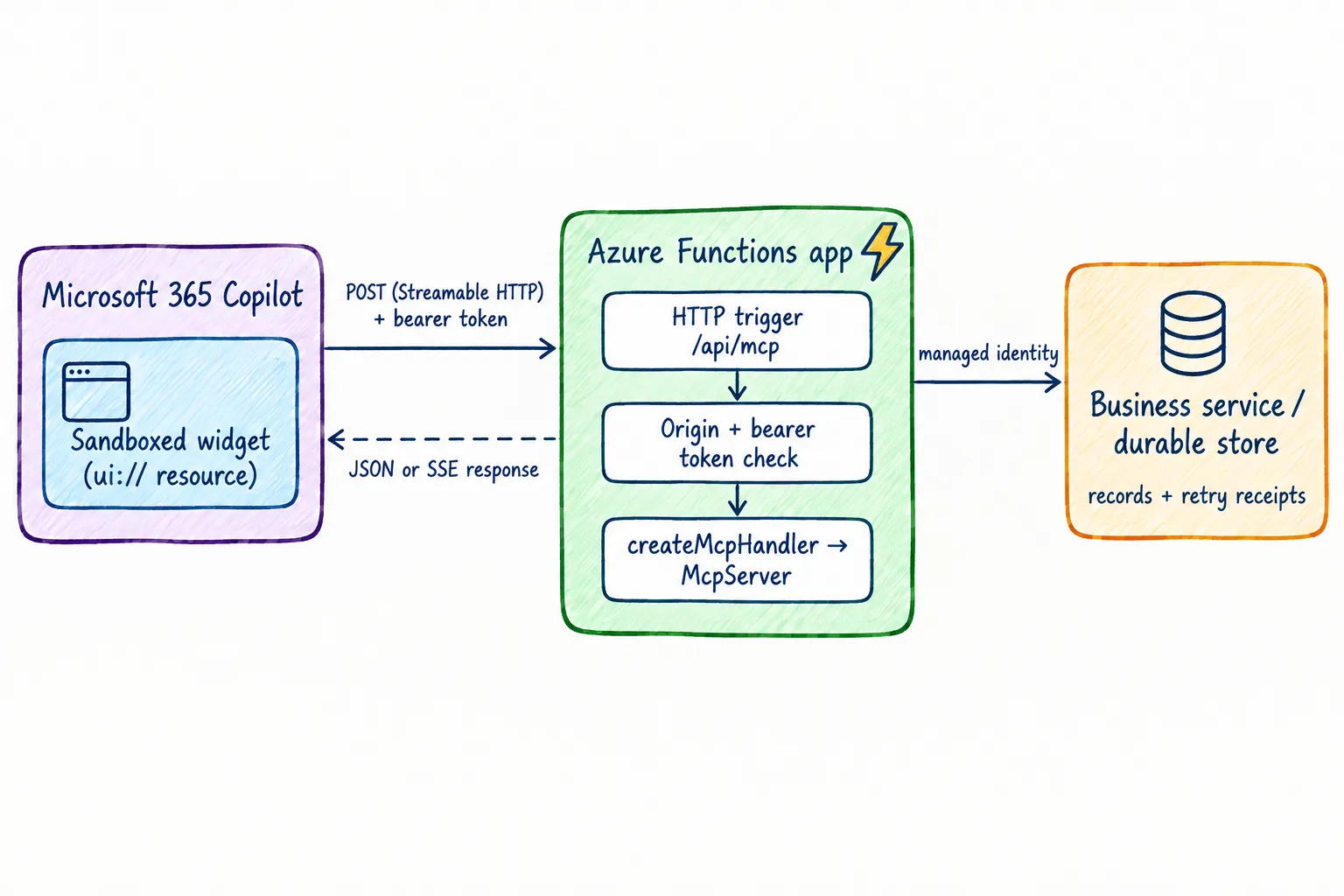
Microsoft 365 Copilot supports MCP Apps for declarative agents, but that does not make every MCP client a UI host. I still test the agent in Copilot itself, and I give tools a useful text result for clients that cannot render the widget.
For this walkthrough, Azure Functions hosts the HTTP endpoint. The UI stays packaged as an MCP App resource served by the MCP server; it is not a React page that calls an arbitrary API from the browser. If a widget needs separately hosted assets, that host, its cache policy, and its browser security headers become another deployment component.
Choose the Functions model and transport
For a new Node.js Function app, use the v4 programming model. Microsoft currently documents Node.js 22.x and 24.x for it. HTTP streaming requires @azure/functions 4.3.0 or later, Functions runtime 4.28 or later, and Core Tools 4.0.5530 or later for local work.
The transport side is defined by the Streamable HTTP specification, revision 2026-07-28:
- The server exposes a single POST endpoint. Every JSON-RPC message is its own POST request.
- The server answers each request with either one JSON object or a server-sent events (SSE) stream scoped to that request.
- The older GET stream endpoint and protocol-level sessions were removed in this revision.
- Servers must validate the
Originheader and reject invalid values with403.
That removal matters for hosting: without a long-lived GET stream, a bounded “POST in, response out” shape fits an HTTP-triggered Function much better than the earlier revisions did. I still check which protocol version the SDK and the Copilot host actually negotiate, because sample and host code may target an earlier revision.
Streaming responses are not enabled by default. The Function app needs one setup call:
import { app } from "@azure/functions";

app.setup({ enableHttpStream: true });
This enables HTTP streams in the Functions app; it does not implement MCP. That is the next boundary to check.
Adapt the handler, not the protocol
The current MCP TypeScript SDK publishes its Node transport wrapper, @modelcontextprotocol/node, for Node’s IncomingMessage and ServerResponse. A Functions v4 HTTP trigger hands me HttpRequest and expects HttpResponseInit instead, so that middleware does not drop in.
What does fit is the SDK’s web-standard handler: createMcpHandler returns a { fetch } object that takes a standard Request and returns a Response. The Functions trigger only needs a small adapter around it.
This excerpt uses @azure/functions 4.17.0 and @modelcontextprotocol/server 2.4.0. The createRequestServer factory, widget HTML bundling, and token validation live in their own modules and are not shown here:
import { app, type HttpRequest, type HttpResponseInit } from "@azure/functions";
import { createMcpHandler, originValidationResponse } from "@modelcontextprotocol/server";
import { createRequestServer } from "../server.js";
import { widgetHtml } from "../widget.js";
import { verifyBearerToken } from "../auth.js";

app.setup({ enableHttpStream: true });

const handler = createMcpHandler(() => createRequestServer(widgetHtml));

const allowedOrigins = [
  "abc123.widget-renderer.usercontent.microsoft.com",
];

export async function mcpEndpoint(
  request: HttpRequest,
): Promise<HttpResponseInit> {
  const webRequest = new Request(request.url, {
    method: request.method,
    headers: request.headers,
    body: await request.text(),
  });

  const rejected = originValidationResponse(webRequest, allowedOrigins);
  if (rejected) {
    return { status: rejected.status, headers: rejected.headers, body: rejected.body };
  }

  const authInfo = await verifyBearerToken(webRequest);
  if (!authInfo) {
    return { status: 401, jsonBody: { error: "invalid_token" } };
  }

  const response = await handler.fetch(webRequest, { authInfo });
  return {
    status: response.status,
    headers: response.headers,
    body: response.body,
  };
}

app.http("mcp", {
  methods: ["POST"],
  authLevel: "anonymous",
  route: "mcp",
  handler: mcpEndpoint,
});
A few decisions in this adapter are deliberate:
- The request body is buffered with
request.text(). Each Streamable HTTP POST carries exactly one JSON-RPC message, so there is nothing to stream inbound. It also avoids a strict-TypeScript mismatch between the FunctionsReadableStreamtype and the oneRequestexpects. - The response body is passed through as a stream.
handler.fetchfrequently answers with a request-scoped SSE stream—my in-memorytools/listcall came back astext/event-stream—which is exactly whyenableHttpStreamis required. authLevel: "anonymous"is not “no authentication”. It turns off Functions keys for this route; the bearer-token check is the actual gate.createMcpHandlernever derives identity from headers itself, and the verifiedauthInforeaches tool handlers asctx.http.authInfo.- The Origin check implements a spec requirement. Copilot’s server-side calls carry no
Originheader and pass; a browser context presenting the wrong origin gets403. The allowed entry is the hashed{hashed-mcp-domain}.widget-renderer.usercontent.microsoft.comhost that Copilot documents for widgets—generate yours with Microsoft’s widget URL generator. CORS and Origin checks are not authentication.
What I actually verified: the excerpt type-checks against the stated package versions with TypeScript 7.0.2 in strict mode, and an in-memory smoke test through handler.fetch returned the expected tools/list result and rejected a wrong Origin with 403. I have not deployed this exact adapter to a Function app or rendered its widget in Copilot; treat those as your acceptance tests, not as given.
If the server outgrows this shape—for example, it needs connection behavior that is awkward on a Function plan—the same McpServer code moves to Azure Container Apps or App Service, where the SDK’s Express, Fastify, Hono, or Node middleware packages apply directly.
Choose the plan after measuring
For a serverless Function app, Microsoft now points new apps at the Flex Consumption plan; the classic Consumption plan is legacy. Flex Consumption offers fast scale-out, virtual network integration, and optional always-ready instances to reduce cold starts. The Premium plan keeps prewarmed workers for apps that run nearly continuously.
I would measure cold start, concurrency, and the streamed response behavior of the actual adapter on the candidate plan before committing. A plan choice does not make in-memory application state durable, and a working sample on one plan is evidence for that plan only.
Keep tools stateless where possible
createMcpHandler runs its factory once per request, so every call gets a fresh McpServer. That matches how I want to operate on Functions anyway: Microsoft documents that the runtime can recycle a worker at any time, and scale-out adds instances that share nothing.
The local walkthrough kept its request records and idempotency receipts in module-level variables outside the factory. That was a labeled demo shortcut. In Azure, both move to a durable store: request records into the backing business service, and retry receipts into storage that is atomic across instances and scoped to the authenticated caller, tenant, and operation.
I also keep write operations safe to retry. A create-request tool validates its input, enforces authorization in the backend, and treats a repeated call with the same submission identifier as the same logical operation. A model-generated tool call is not an authorization check.
Package and serve the React UI
An MCP App is more than a React bundle. The server associates a ui:// resource with a tool, and the host loads that resource and provides the UI-to-tool bridge. I build the React output into single-file HTML, register it as the tool’s UI resource, and version it together with the server and tool contract. The MCP Apps overview describes the lifecycle.
The split keeps responsibilities clear: the widget presents the form and request list, while the MCP server validates and authorizes each action. I never put credentials in the UI bundle or trust identity fields supplied by the browser. I also check Copilot’s supported bridge capabilities and give any unsupported API a fallback.
Separate inbound and downstream identity
There are two different authentication questions:
- Who is calling the MCP server? Configure one of the authentication schemes supported for MCP plugins: Microsoft Entra single sign-on, OAuth 2.0 authorization-code flow, or dynamic client registration. API keys are not supported for MCP plugins used as declarative-agent actions, and anonymous access is for development only. Whatever Copilot sends, the server still validates the token’s signature, issuer, audience, lifetime, and scopes itself—that is the
verifyBearerTokenboundary in the adapter. - What can the Function access? Use a managed identity for supported Azure resources and grant it only the roles it needs. This is application identity; it does not mean the Function acts with the signed-in user’s permissions.
When an operation must honor the user’s own permissions, use a supported delegated flow instead of silently substituting the Function’s broader service identity. I cover these trust boundaries in more depth in the security article of this series.
Make deployment repeatable
I want the deployed artifact to contain the server and the UI resource that matches it. My pipeline should:
- Install from the lockfile and build both the Node.js server and the widget HTML.
- Run unit tests for input validation, authorization decisions, and the shared request-tool contract.
- Run transport checks against the packaged app: initialization, tool discovery, tool calls, error responses, the Origin rejection path, and the JSON and SSE response shapes required by Streamable HTTP.
- Deploy infrastructure and app settings separately from code, with no secrets in the repository.
- Authenticate the deployment with federated workload identity where supported instead of a long-lived publish secret.
- Smoke-test the deployed endpoint and the Copilot agent before promotion, and keep a known-good artifact available for rollback.
Deployment credentials stay separate from the Function’s runtime identity. Local settings stay out of source control, and production secrets do not belong in client configuration or static UI files.
Observe the whole tool call
The useful trace crosses several boundaries: the host request, MCP tool invocation, Function execution, and downstream service call. I propagate a correlation ID where the components allow it and log the tool name, outcome, duration, and safe identifiers. I do not log bearer tokens or whole request payloads just to make a failed demo easier to debug.
I set explicit timeouts and retry behavior for downstream work. If a client retries a write after a timeout, the idempotency design should make the outcome safe. I also watch for cold starts, throttling, and scale-out, and return a clear tool error rather than a success-shaped response when a dependency fails.
Verify it in the real host
An MCP Inspector run is useful for protocol behavior, but it does not prove that Microsoft 365 Copilot can authenticate or render the widget. I test both layers:
- Use an MCP client or Inspector against the deployed endpoint to check tool schemas, valid and invalid inputs, response shapes, and the negotiated protocol version.
- Sideload the declarative agent with Microsoft 365 Agents Toolkit and confirm tool discovery, authentication, and widget rendering in Copilot itself.
- Exercise the form and list: loading, empty, success, and error states, plus the text fallback for a client without UI support.
- Send a missing, expired, and wrong-audience token, and a user who is not authorized for the operation. The backend must reject all of them.
- Confirm the managed identity holds only the downstream permissions it needs.
- Restart and scale the app during testing. Records and retry receipts must survive without one warm worker.
- Test a slow dependency, a repeated create request with the same submission identifier, and the rollback path.
Takeaway
Azure Functions is a reasonable home for bounded MCP tool work, and the 2026-07-28 Streamable HTTP revision made the fit better: one POST endpoint, request-scoped responses, no long-lived protocol stream to babysit. The SDK’s web-standard fetch handler closes most of the remaining gap with a small, testable adapter.
The parts that deserve attention are the boundaries: who calls the server, what the Function may touch, where durable state lives, and which origin may embed the widget. Keep those explicit, and the app scales without losing state or quietly broadening anyone’s permissions.
Official references
- Azure Functions Node.js developer reference
- HTTP streams in Node.js Function apps
- MCP Streamable HTTP specification, revision 2026-07-28
- MCP TypeScript SDK and middleware packages
- Serve MCP on web-standard runtimes
- Azure Functions hosting plans
- MCP apps in Microsoft 365 Copilot
- Configure authentication for MCP and API plugins
- Managed identities for App Service and Azure Functions
- MCP Apps overview and lifecycle