Building MCP UX Servers with .NET and Azure Functions
The Node.js backend from Part 3 works. I still want a .NET version—not because the Node.js one is wrong, but because many Microsoft 365 teams live in C#, and the backend language should be a hosting decision, not a UI rewrite.
Part 4 of From Agent to Application: Bringing UX into Microsoft 365 Copilot.
The package versions and documentation in this article were checked on November 1, 2026. The C# code excerpts compile against the stated packages; they are labeled excerpts, not a complete runnable application. Verify current SDK versions and Copilot support before deploying.
One widget, two .NET tracks
The React widget from Part 2 does not care which language serves it. It cares about three things: the tool names (list_requests, create_request), the argument names (title, submissionId), and the structured result shape (revision plus a requests array). That contract is the thing I port—not the TypeScript code.
For .NET there are two verified tracks, and they are different programming models rather than one SDK on two hosts:
- ASP.NET Core with the official MCP C# SDK. The
ModelContextProtocol.AspNetCorepackage hosts the Streamable HTTP endpoint, andModelContextProtocol.Extensions.Appsadds the MCP Apps UI-resource support. At the time of checking, version 2.3.0 is the current stable release, targeting .NET 8, 9, and 10. - The Azure Functions MCP extension (
Microsoft.Azure.Functions.Worker.Extensions.Mcp, version 1.6.0 at the time of checking). Here the Functions host implements the MCP server, and I only write tool, resource, and prompt triggers. For C#, it supports only the isolated worker model and requiresMicrosoft.Azure.Functions.Worker2.1.0 or later.
I would not try to share tool classes between the two tracks. The SDK uses [McpServerTool] attributes and returns CallToolResult; the Functions extension uses [McpToolTrigger] bindings with its own invocation context. What I share is the business service, the validation rules, and the UI bundle.
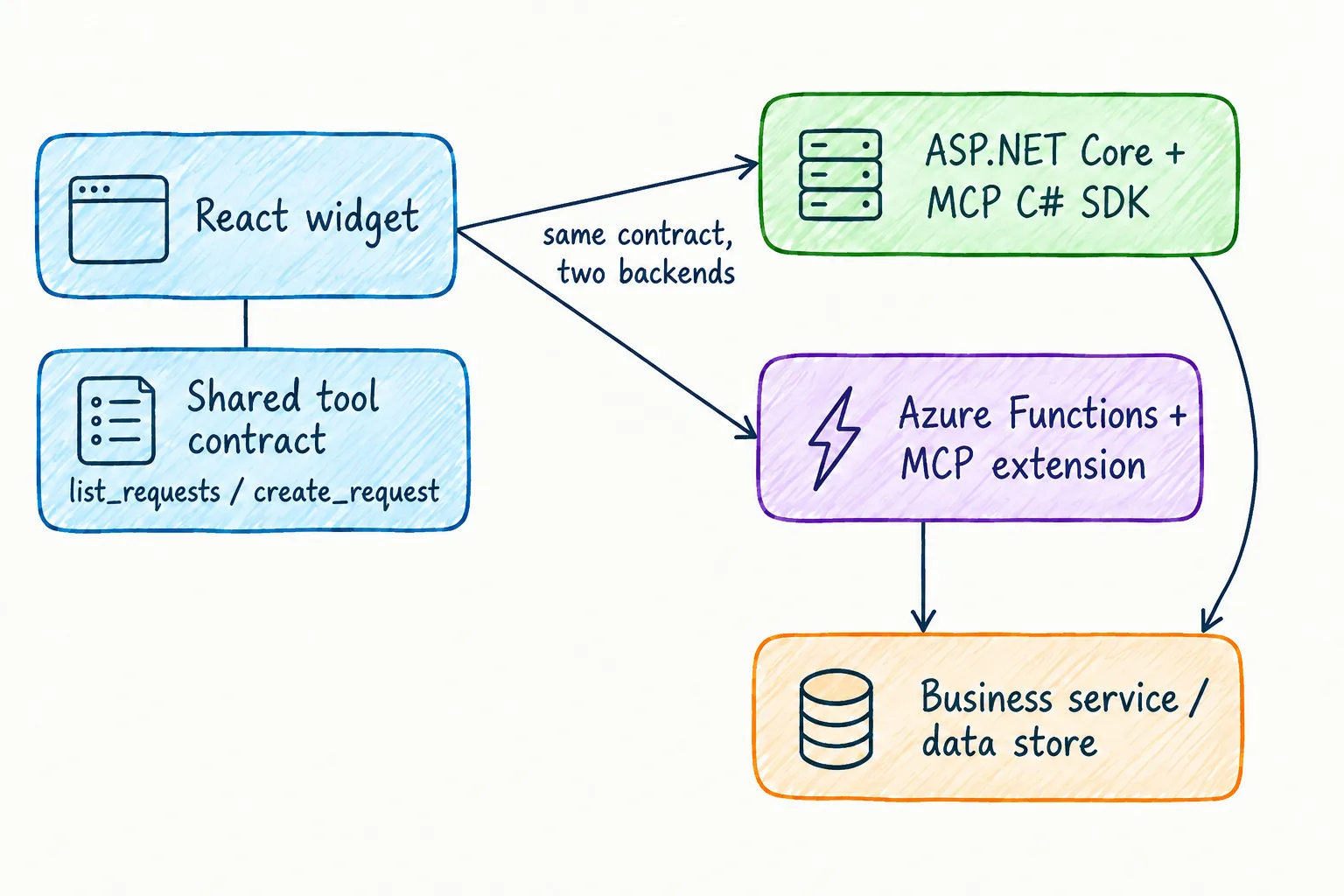
Mirror the contract, not the code
The Node.js server returns a structured result with camelCase fields because the widget validates it with a Zod schema. C# records serialize in PascalCase by default, and Requests is not requests. That mismatch fails quietly: the tool call succeeds and the widget rejects the payload.
Here is the tool class for the SDK track. I keep validation and the idempotency receipts in a separate RequestStore service, exactly like the Node.js version:
using ModelContextProtocol.Extensions.Apps;
using ModelContextProtocol.Protocol;
using ModelContextProtocol.Server;
using System.ComponentModel;
using System.Text.Json;

public sealed record RequestItem(string id, string title, string status, string submittedAt);

[McpServerToolType]
public sealed class RequestTools(RequestStore store)
{
    [McpServerTool(Name = "list_requests")]
    [McpAppUi(ResourceUri = "ui://requests/app.html")]
    [Description("Show the request form and submitted demo requests.")]
    public CallToolResult ListRequests() => Snapshot();

    [McpServerTool(Name = "create_request")]
    [McpAppUi(ResourceUri = "ui://requests/app.html")]
    [Description("Submit a demo request with a stable retry identifier.")]
    public CallToolResult CreateRequest(
        [Description("Request title")] string title,
        [Description("Client-generated retry identifier")] string submissionId)
    {
        store.CreateOrReplay(title, submissionId);
        return Snapshot();
    }

    private CallToolResult Snapshot()
    {
        var (revision, requests) = store.Snapshot();
        return new CallToolResult
        {
            Content = [new TextContentBlock { Text = $"{requests.Count} submitted request(s)." }],
            StructuredContent = JsonSerializer.SerializeToElement(new { revision, requests }),
        };
    }
}
Two deliberate choices are worth calling out:
- The record properties are camelCase on purpose, so the serialized shape matches the widget’s schema. In a larger codebase I would keep conventional C# naming and use a camelCase
JsonSerializerOptionsor[JsonPropertyName]instead of bending the style rules. - The SDK generates the tool input schema from the C# parameter names, so
submissionIdmust stay camelCase too. The parameter names are part of the contract.
CreateOrReplay keeps the semantics from Part 2: trim and validate the title, return the stored record when the same submissionId arrives again with the same title, and throw an McpException when the identifier is reused with different input. A thrown McpException becomes a proper tool error instead of a success-shaped empty list. And as before: a model-generated tool call is not an authorization check—the backend still decides who may create a request.
Track one: ASP.NET Core with the MCP C# SDK
The hosting setup is small. The same builder pattern registers tools, resources, and the MCP Apps extension:
using ModelContextProtocol.AspNetCore;
using ModelContextProtocol.Extensions.Apps;
using ModelContextProtocol.Server;

var builder = WebApplication.CreateBuilder(args);

builder.Services.AddSingleton<RequestStore>();
builder.Services
    .AddMcpServer()
    .WithHttpTransport()
    .WithTools<RequestTools>()
    .WithResources<RequestResources>()
    .WithMcpApps();

var app = builder.Build();
app.MapMcp("/mcp");
app.Run();
The UI resource is the built React bundle, served with the MCP Apps HTML MIME type:
using ModelContextProtocol.Extensions.Apps;
using ModelContextProtocol.Server;
using System.ComponentModel;

[McpServerResourceType]
public sealed class RequestResources
{
    [McpServerResource(
        UriTemplate = "ui://requests/app.html",
        Name = "request-widget",
        MimeType = McpApps.HtmlMimeType)]
    [Description("Request form and list widget for the MCP App host")]
    public static string GetRequestWidget() =>
        File.ReadAllText(Path.Combine(AppContext.BaseDirectory, "ui", "app.html"));
}
The [McpAppUi] attribute on the tools links them to this ui:// resource, which is exactly what the host needs to render the widget after a tool call. Be aware that the Apps extension is currently marked experimental: the official WeatherAppServer sample suppresses the MCPEXP003 diagnostic in its project file, and I would expect this API surface to move.
This track deploys like any ASP.NET Core app: Azure Container Apps or App Service, with full control over middleware, authentication handlers, and connection behavior. If I need SDK features beyond bounded tool calls, this is where I host them.
Track two: the Azure Functions MCP extension
On Functions, I do not bring the MCP SDK at all. The extension implements the server, and my functions are triggers. Tool metadata links the tool to the UI resource through a JSON _meta payload:
using Microsoft.Azure.Functions.Worker;
using Microsoft.Azure.Functions.Worker.Extensions.Mcp;

public class RequestFunctions(RequestStore store)
{
    private const string ToolMetadata = """
        { "ui": { "resourceUri": "ui://requests/app.html" } }
        """;

    [Function(nameof(CreateRequest))]
    public object CreateRequest(
        [McpToolTrigger("create_request", "Submit a demo request with a stable retry identifier.")]
        [McpMetadata(ToolMetadata)]
            ToolInvocationContext context,
        [McpToolProperty("title", "Request title", isRequired: true)]
            string title,
        [McpToolProperty("submissionId", "Client-generated retry identifier", isRequired: true)]
            string submissionId)
    {
        store.CreateOrReplay(title, submissionId);
        return store.Snapshot();
    }

    [Function(nameof(GetRequestWidget))]
    public string GetRequestWidget(
        [McpResourceTrigger(
            "ui://requests/app.html",
            "request-widget",
            MimeType = "text/html;profile=mcp-app",
            Description = "Request form and list widget")]
            ResourceInvocationContext context)
        => File.ReadAllText(Path.Combine(AppContext.BaseDirectory, "ui", "app.html"));
}
The resource trigger uses the text/html;profile=mcp-app MIME type from the resource trigger documentation, and the HTML file ships with the Function app through a CopyToOutputDirectory entry in the project file.
One thing I verify rather than assume: how the extension maps my returned object into the tool result. The widget expects the snapshot in structuredContent, and the extension—not my code—builds the CallToolResult. I test that mapping against the actual protocol response before touching the widget. The official .NET sample pairs exactly this pattern with an MCP Apps widget, so it is the reference I compare against.
The deployed endpoint is fixed: Streamable HTTP at /runtime/webhooks/mcp. The older SSE endpoint still exists at /runtime/webhooks/mcp/sse, but newer protocol versions deprecate it, and on Functions it additionally depends on Azure Queue storage in the host storage account. I build against Streamable HTTP and treat SSE as legacy compatibility only.
The Part 3 state warning applies with more force here: Functions workers recycle and scale out, so the in-memory RequestStore is a demo convenience. Durable records and idempotency receipts belong in a backing service, keyed to the authenticated caller.
Reuse the React UI unchanged
The widget bundle from Part 2 stays as it is. app.callServerTool sends title and submissionId, ontoolresult parses the snapshot, and both are supported bridge capabilities in Copilot. The backend swap is only honest if I re-test the edges:
- Field naming: every property the widget validates must arrive in camelCase from the .NET serializer.
- Error shape: a rejected submission must surface as a tool error with useful text, not as an empty success.
- Repeat submission: the same
submissionIdmust return the existing record from both backends.
I version the UI resource together with the server that serves it. A widget built for last month’s contract quietly breaking against this month’s server is a failure mode I would rather make impossible than debug.
Run both tracks locally
For the ASP.NET Core track, dotnet run exposes the endpoint at /mcp. For Functions, the Azure Functions Core Tools (version 4.0.7030 or later for the MCP extension) serve it locally:
func start
# MCP endpoint: http://localhost:7071/runtime/webhooks/mcp
I check protocol behavior first: initialization, tools/list, the linked ui:// resource, a valid and an invalid create_request, and a duplicate submissionId. Only after those pass do I sideload the declarative agent and repeat the Copilot demo from the Node.js path.
Secure the deployed Function app
When the Function app runs in Azure, the extension requires a system key named mcp_extension in the x-functions-key header by default. That key is transport plumbing, not user authentication—and Copilot MCP plugins do not support API keys anyway. The supported schemes are OAuth and Microsoft Entra single sign-on; anonymous access is for development only.
So the production posture looks like this:
- Put built-in MCP server authorization in front of the endpoint as the identity-based access layer, and validate the caller’s identity and permissions in the backend.
- Use a managed identity for downstream Azure resources, scoped to the roles the app actually needs. That is application identity—when an operation must honor the signed-in user’s own permissions, use the delegated flow instead.
- Generate the Copilot widget origin for CORS with Microsoft’s Widget Host URL generator rather than opening the server to every origin.
The pipeline, observability, and rollback practices from Part 3 carry over unchanged.
Verify both backends against the same cases
Because both servers claim the same contract, I run one checklist against both:
tools/listexposeslist_requestsandcreate_requestwith matching input schemas.- The
ui://requests/app.htmlresource loads with the MCP Apps MIME type. - A valid submission creates exactly one record; the snapshot shape validates against the widget schema.
- A repeated
submissionIdwith the same title returns the existing record; with a different title it fails. - An empty or over-long title and an unauthorized caller are rejected by the backend, not just by the form.
- Restarting or scaling the app does not silently lose records once the durable store is in place.
If a case passes on one backend and fails on the other, the contract was never as shared as I thought—and I want to learn that in a test run, not in a demo.
Takeaway
.NET gives me two real tracks for the same MCP App: the MCP C# SDK on ASP.NET Core when I want the full server surface, and the Azure Functions MCP extension when bounded tool triggers and managed hosting fit better. They are different programming models, so I share the contract, the business service, and the React bundle—not the server code.
The widget from Part 2 did not change at all. That is the payoff of keeping the UI contract independent of the backend language.
For the details that change over time, I use the Azure Functions MCP bindings overview, the MCP tool trigger and resource trigger references, the MCP C# SDK and its documentation, the remote MCP Functions .NET sample, and MCP apps in Microsoft 365 Copilot.