Copilot Retrieval API (Beta): What You Can Do Today

TL;DR
- The Copilot Retrieval API is currently in Beta and designed for user-scoped retrieval over Microsoft 365 content.
- You can only call it with user-delegated tokens; app-only is not supported yet. Use the OAuth 2.0 On-Behalf-Of (OBO) flow.
- Indexing details are opaque; you don’t control how/when documents are indexed beyond standard M365 ingestion and policies.
- Focus on correct auth, tenant and user permissions, and responsible query patterns; accept that indexing behavior may change.
What is the Copilot Retrieval API (Beta)?
The Copilot Retrieval API provides a programmatic way to ask Copilot to retrieve relevant snippets from Microsoft 365–scoped content (like SharePoint/OneDrive/Teams files) on behalf of a user. Think of it as a managed, compliant retrieval endpoint that respects the user’s permissions and organization’s policies.
Because it’s in Beta, capabilities, payload shapes, and performance characteristics can change. Treat it as an early-access interface: great for pilots and prototypes, not yet for strict SLAs.
Current reality and limits
Here’s what’s true today:
- Delegated only
- You must use user-delegated access. There is no app-only (client credentials) support yet.
- Concretely: your backend needs to exchange a user token using the On-Behalf-Of (OBO) flow to call the API.
- Indexing is opaque
- You don’t get knobs to control indexing cadence, scoring, or storage internals.
- Content availability and freshness follow Microsoft 365’s ingestion and compliance pipelines; expect eventual consistency, not immediate reflection of every change.
- Security and compliance first
- Retrieval strictly respects the calling user’s permissions, Microsoft 365 DLP/labeling, and tenant policies.
- “If the user can’t access it in M365, the API won’t retrieve it.”
Authentication: using OBO (On-Behalf-Of)
Since only user-delegated tokens work, a common setup looks like this:
- Frontend acquires a user token (e.g., with MSAL in the browser) for your API audience.
- Backend exchanges that token using OBO to obtain a downstream token for the Copilot Retrieval scope.
- Backend calls the Copilot Retrieval API with that downstream token.
Key implications:
- Your app registration must be configured for the OBO flow (expose an API, add the appropriate delegated permissions, and allow token exchange).
- Tokens are per-user; cache them carefully and handle refresh/expiration.
- Use the minimum scopes required; don’t request broad delegated permissions you don’t need.
Minimal Node.js (msal-node) sketch
import { ConfidentialClientApplication } from '@azure/msal-node';

const msal = new ConfidentialClientApplication({
  auth: {
    clientId: process.env.AZURE_AD_CLIENT_ID!,
    clientSecret: process.env.AZURE_AD_CLIENT_SECRET!,
    authority: `https://login.microsoftonline.com/${process.env.AZURE_AD_TENANT_ID}`,
  },
});

export async function exchangeOnBehalfOf(userAccessToken: string, scopes: string[]) {
  const result = await msal.acquireTokenOnBehalfOf({
    oboAssertion: userAccessToken,
    scopes, // e.g., ["{retrieval-api-scope}"], subject to beta docs
    skipCache: false,
  });
  if (!result || !result.accessToken) throw new Error('OBO failed');
  return result.accessToken;
}
Call the retrieval endpoint with the downstream token:
import fetch from 'node-fetch';

export async function getRelevantPassages(downstreamToken: string, query: string) {
  const res = await fetch('https://graph.microsoft.com/beta/copilot/retrieval/query', {
    method: 'POST',
    headers: {
      'Authorization': `Bearer ${downstreamToken}`,
      'Content-Type': 'application/json'
    },
    body: JSON.stringify({ query }) // shape may change in Beta
  });
  if (!res.ok) throw new Error(`Retrieval failed: ${res.status} ${await res.text()}`);
  return res.json();
}
Notes:
- Endpoint and request/response shapes are illustrative and may change during Beta.
- Always consult the latest docs for exact scopes, URL, and payload format.
Minimal C# (Microsoft.Identity.Web) sketch
using Microsoft.Identity.Web;
using System.Net.Http.Headers;
using System.Text;

public class RetrievalClient
{
    private readonly ITokenAcquisition _tokenAcquisition;
    private readonly HttpClient _http;

    public RetrievalClient(ITokenAcquisition tokenAcquisition, HttpClient http)
    {
        _tokenAcquisition = tokenAcquisition;
        _http = http;
    }

    public async Task<string> QueryAsync(string userScope, string query)
    {
        var token = await _tokenAcquisition.GetAccessTokenForUserAsync(new[] { userScope });
        _http.DefaultRequestHeaders.Authorization = new AuthenticationHeaderValue("Bearer", token);

        var json = $"{{\"query\":\"{query}\"}}";
        var payload = new StringContent(json, Encoding.UTF8, "application/json");
        var resp = await _http.PostAsync("https://graph.microsoft.com/beta/copilot/retrieval/query", payload);
        resp.EnsureSuccessStatusCode();
        return await resp.Content.ReadAsStringAsync();
    }
}
Again, treat this as a structural example, not a final SDK binding.
What you can (and can’t) influence
You can influence:
- The user experience: prompt quality, query construction, and retrieval timeouts/retries.
- Auth robustness: correct OBO implementation, token caching, and error handling.
- Governance: ensure your app only requests the minimal delegated scopes and logs requests for auditing.
You can’t (today):
- Force reindexing or tune ranking algorithms.
- Use app-only tokens to perform broad, service-level retrieval.
- Bypass user permissions; results always reflect the calling user’s access.
Practical guidance for pilots
- Expect eventual consistency. If a file just changed, the retrieval result may lag.
- Design for graceful degradation: handle empty/noisy results and timeouts.
- Log correlation IDs and response metadata to help Support/IT investigate issues.
- Build an admin “auth health” check that validates OBO configuration and scopes.
- Communicate limits to stakeholders early: “Beta, delegated only, opaque indexing.”
Using filters effectively (Beta)
Filters help you narrow scope, reduce noise, and improve latency. In Beta, treat filters as best-effort hints that still pass through permission and policy trimming.
What to try in pilots:
- Scope narrowing
- Limit to specific SharePoint sites, drives, folders, or Teams channels when available.
- Prefer “closest known container” over whole-tenant.
- Content type
- File types: docx, pptx, xlsx, pdf, txt, md, etc.
- Exclude large binaries or media if not relevant.
- Time windows
- Filter by modified/created after a certain date (e.g., “last 90 days”).
- Ownership/people
- Prioritize documents authored by or shared with specific users or groups.
- Business metadata (when supported)
- Project codes, labels, or repository hints relevant to your context.
Illustrative request shape (subject to change in Beta):
{
  "query": "account escalation runbook",
  "filters": {
    "locations": [
      "sharepoint:siteId:00000000-0000-0000-0000-000000000000",
      "teams:channelId:19:abc...@thread.tacv2"
    ],
    "fileTypes": ["docx", "pptx", "pdf"],
    "modifiedAfter": "2025-09-01T00:00:00Z",
    "owners": ["alexw@contoso.com"],
    "labels": ["Confidential", "Public"],
    "maxSnippets": 8
  }
}
TypeScript call sketch with filters:
export async function getPassagesWithFilters(token: string, query: string) {
  const body = {
    query,
    filters: {
      fileTypes: ["docx", "pptx"],
      modifiedAfter: new Date(Date.now() - 1000 * 60 * 60 * 24 * 90).toISOString()
    }
  };
  const res = await fetch('https://graph.microsoft.com/beta/copilot/retrieval/query', {
    method: 'POST',
    headers: { 'Authorization': `Bearer ${token}`, 'Content-Type': 'application/json' },
    body: JSON.stringify(body)
  });
  if (!res.ok) throw new Error(`Retrieval failed: ${res.status} ${await res.text()}`);
  return res.json();
}
Notes:
- Exact filter names, accepted values, and combinations may change during Beta—validate against the latest docs.
- Filters reduce candidate space, but the service still enforces permissions, labels, and policies before returning results.
Permissions, compliance, and sensitivity labels
Retrieval results are always permission-trimmed and policy-aware.
- Permission trimming
- Only content the calling user can access will be retrieved. SharePoint/OneDrive/Teams permissions apply as usual.
- Expect empty results or 403/401 in cases of insufficient access or token issues.
- Compliance and DLP
- Microsoft 365 compliance (DLP, retention, conditional access) can suppress, block, or alter what is returned.
- Your app must handle blocked/empty results gracefully and avoid retry storms.
- Purview Sensitivity Labels
- Labeled and/or rights-managed (encrypted) content returns only if the calling user has rights; otherwise it’s excluded.
- Don’t assume label names are surfaced in responses; prefer server-side filtering when supported, or post-filter in your app carefully.
- Avoid caching labeled content across users. Cache per-user and respect token expiration.
- Audit and traceability
- Calls are logged under your tenant’s normal auditing pipeline. Log correlation IDs you receive to help admins investigate.
Practical tips:
- Start with narrow scopes (known sites/folders) and only widen when needed.
- Prefer whitelisting file types over blacklisting.
- When troubleshooting “missing” content, test access in the native M365 client first—if the user can’t open it there, retrieval won’t return it.
Developer checklist custom APP ✅
- App registration created; backend is a confidential client (client secret/certificate).
- OBO flow wired: frontend acquires a user token, backend exchanges it for retrieval scopes.
- Minimal delegated scopes requested, consented, and verified in pre-prod.
- Error handling in place for 401/403, throttling (429), and transient failures.
- Logging and privacy: no PII in logs; secure storage for secrets.
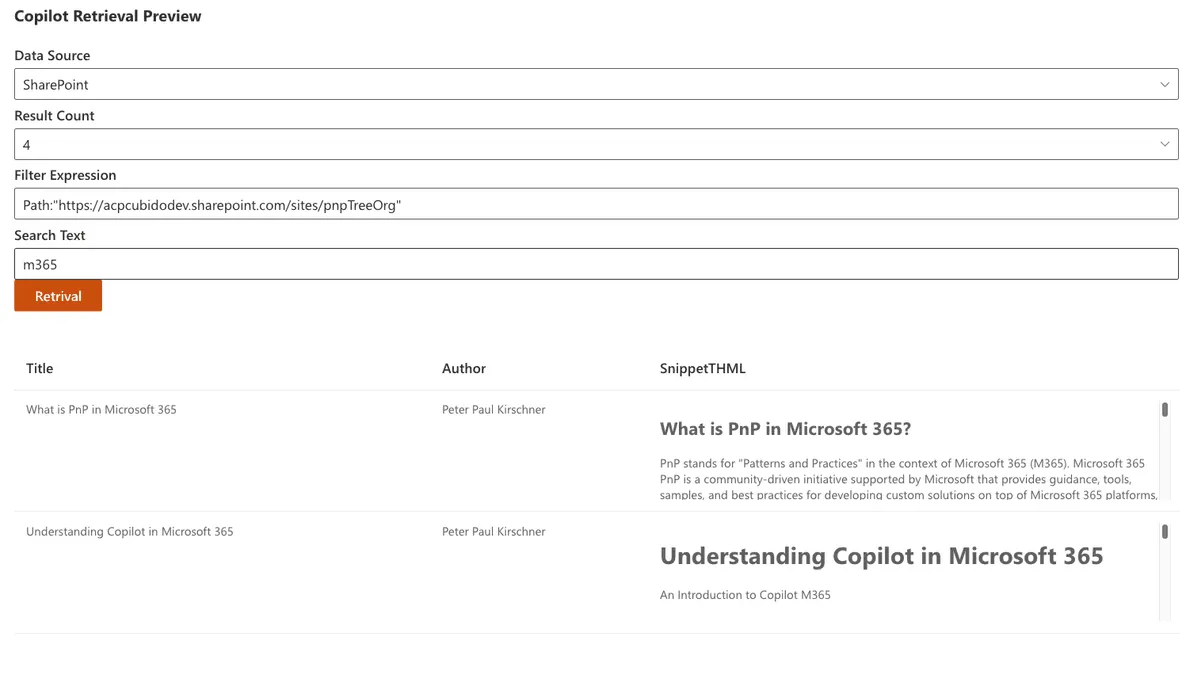
Play with API in SharePoint
You can use my sample in the pnp sample Libaray
 Sample Link
Microsoft Adoption
Sample Link
Microsoft Adoption
FAQ
Can I run this as a daemon using app-only credentials?
Not today. Only user-delegated flows are supported in Beta; use OBO.
Can I control indexing or force refreshes?
No direct controls. Treat indexing as a managed, internal pipeline that follows M365 policies.
How should I think about performance?
Assume variability. Implement retries with backoff, reasonable timeouts, and user feedback in the UX.