SPGridView Filter Fields in the wrong Order
this post is a little throwback.
SPGridView was one of the most useful controls in the classic SharePoint stack. It looked and behaved like a SharePoint list view and gave us powerful table behavior with relatively little code.
In modern SharePoint Online, this exact model is not what we build with anymore. Still, I want to preserve this knowledge so it stays searchable and reusable when we need historical context, migrations, or legacy maintenance.
Why I wrote this (I was asked)
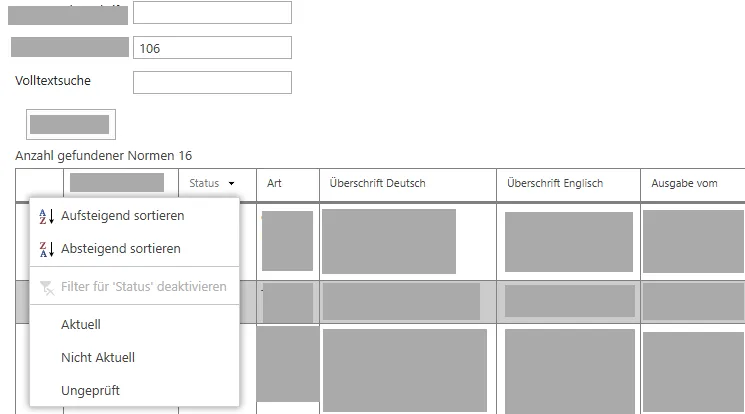
I was asked why filter in an SPGridView looked broken, shifted, or attached to the wrong column.
In most cases, the issue was not in sorting logic itself. The real issue was FilterDataFields order.
Goal
In this post, I document the baseline setup for:
- Paging
- Sorting
- Filtering
1) Prepare a list and a Visual WebPart
- Create a list with columns such as:
TitleMetadataLocationFromDateTimeToDateTime
- Add a Visual WebPart to your project.
- Place an
SPGridViewinside the WebPart.
2) Initialize ObjectDataSource in page load
In page load, create the data source and then bind the grid:
const string DATASOURCEID = "gridDS";

gridDS = new ObjectDataSource();

gridDS.ID = DATASOURCEID;

gridDS.SelectMethod = "SelectData";

gridDS.TypeName = this.GetType().AssemblyQualifiedName;

gridDS.ObjectCreating += new ObjectDataSourceObjectEventHandler(gvCRBooked_ObjectCreating);

this.Controls.Add(gridDS);

BindGrid();
3) Bind the grid and enable features
Enable paging, sorting, and filtering in one place:
private void BindGrid()

{

    gvCRBooked.AllowPaging = true;

    // Sorting

    gvCRBooked.AllowSorting = true;

    //allow Filtering

    gvCRBooked.FilterDataFields = "Title,Metadata,Location,FromDateTime,ToDateTime";

    gvCRBooked.FilteredDataSourcePropertyName = "FilterExpression";

    gvCRBooked.FilteredDataSourcePropertyFormat = "{1} = '{0}'";

    gvCRBooked.Sorting += new GridViewSortEventHandler(gvCRBooked_Sorting);

    gvCRBooked.PageIndexChanging += new GridViewPageEventHandler(gvCRBooked_PageIndexChanging);

    //For Filtering

    gridDS.Filtering += new ObjectDataSourceFilteringEventHandler(gvCRBooked_Filtering);

    gvCRBooked.AutoGenerateColumns = false;

    gvCRBooked.AllowFiltering = true;

    gvCRBooked.PagerTemplate = null;

    gvCRBooked.PageSize = 10;

    gvCRBooked.DataSourceID = gridDS.ID;

    gvCRBooked.DataBind();

}
4) Implement pagination
void gvCRBooked_PageIndexChanging(object sender, GridViewPageEventArgs e)

{

    gvCRBooked.PageIndex = e.NewPageIndex;

    gvCRBooked.DataSourceID = gridDS.ID;

    gvCRBooked.DataBind();

}
5) Implement sorting
void gvCRBooked_Sorting(object sender, GridViewSortEventArgs e)

{
     string lastExpression = "";

     if (ViewState["SortExpression"] != null)

            lastExpression = ViewState["SortExpression"].ToString();

            string lastDirection = "asc";

     if (ViewState["SortDirection"] != null)

            lastDirection = ViewState["SortDirection"].ToString();

            string newDirection = string.Empty;

    if (e.SortExpression == lastExpression)

    {

        e.SortDirection = (lastDirection == "asc") ? System.Web.UI.WebControls.SortDirection.Descending : System.Web.UI.WebControls.SortDirection.Ascending;

    }       newDirection = (e.SortDirection == System.Web.UI.WebControls.SortDirection.Descending) ? "desc" : "asc";

            ViewState["SortExpression"] = e.SortExpression;

            ViewState["SortDirection"] = newDirection;

            gvCRBooked.DataBind();             //For Filter

   if (ViewState["FilterExpression"] != null)

   {

      gridDS.FilterExpression = (string)ViewState["FilterExpression"];

   }

}
6) Implement filtering
private void gvCRBooked_Filtering(object sender, ObjectDataSourceFilteringEventArgs e)

{

    ViewState["FilterExpression"] = ((ObjectDataSourceView)sender).FilterExpression;

}
Filter not correct or on the wrong position? Check FilterDataFields order
SPGridView uses DataSourceID to locate the ObjectDataSource. After that, it sets the property defined in FilteredDataSourcePropertyName (here: FilterExpression).
FilterDataFields is a little bit tricky:
- Keep it in exactly the same order as your displayed fields.
- If you have a column without a filter, you must still keep its position with an empty value.
- If order is wrong, Filter can look incorrect or appear on the wrong column.
Use this pattern when a column has no filter:
"Title,,Location,FromDateTime,ToDateTime";TL;DR
- This is a classic/legacy SharePoint pattern, preserved on purpose.
- Initialize and register
ObjectDataSourcecorrectly. - Enable
AllowPaging,AllowSorting, andAllowFilteringon the grid. - Keep sort/filter state in
ViewState. - Ensure
FilterDataFieldsorder matches your columns.