SPFx 1.22 with Heft — Stylelint with autofix

Goal
Add a standalone Heft task to validate styles (CSS/SCSS) with Stylelint in an SPFx 1.22 solution, with an optional --fix parameter for autofixes. It should:
- Run standalone via
heft style-lint(with optional--fix) - Run via npm alias
npm run style:lintandnpm run style:fix - Optionally run automatically before a production build using an npm
prebuildhook
This follows Microsoft’s guidance to use Heft’s Run Script plugin for custom steps, without modifying gulp tasks.
1) Install dependencies
npm install --save-dev stylelint stylelint-config-standard-scssCreate a basic Stylelint config at the repo root:
{
  "extends": "stylelint-config-standard-scss",
  "rules": {
    "selector-class-pattern": null,
    "custom-property-pattern": null,
    "rule-empty-line-before": null,
    "scss/at-rule-no-unknown": [
      true,
      {
        "ignoreAtRules": ["value"]
      }
    ],
    "scss/load-partial-extension": null
  }
}
2) Add the lint script
Create config/run-script/style-lint.mjs in your SPFx repo. It scans typical style locations and runs Stylelint. Pass --fix to enable autofixes.
/import { execSync } from 'child_process';

export async function runAsync({ heftTaskSession, heftConfiguration }) {
  const logger = heftTaskSession.logger;

  logger.terminal.writeLine('Running stylelint...');

  try {
    execSync('npx stylelint "src/**/*.scss"', {
      stdio: 'inherit',
      cwd: heftConfiguration.buildFolderPath
    });
    logger.terminal.writeLine('Stylelint passed!');
  } catch (error) {
    logger.emitError(new Error('Stylelint failed!'));
  }
}
3) Configure Heft for standalone + build
Add a dedicated style-lint phase to call it directly, and optionally hook into the build phase.
{
	"$schema": "https://developer.microsoft.com/json-schemas/heft/v0/heft.schema.json",
	"extends": "@microsoft/spfx-web-build-rig/profiles/default/config/heft.json",
	"phasesByName": {
		"style-lint": {
			"phaseDescription": "Standalone style lint",
			"tasksByName": {
				"style-lint": {
					"taskPlugin": {
						"pluginPackage": "@rushstack/heft",
						"pluginName": "run-script-plugin",
						"options": { "scriptPath": "./config/run-script/style-lint.mjs" }
					}
				}
			}
		}
	}
}
Optional: Attach to build phase to run as part of heft build.
{
	"$schema": "https://developer.microsoft.com/json-schemas/heft/v0/heft.schema.json",
	"extends": "@microsoft/spfx-web-build-rig/profiles/default/config/heft.json",
	"phasesByName": {
		"build": {
			"tasksByName": {
				"stylelint": {
                "taskPlugin": {
                    "pluginPackage": "@rushstack/heft",
                    "pluginName": "run-script-plugin",
                    "options": { "scriptPath": "./config/run-script/stylelint.mjs" }
                    }
                }
            }
        },
        "style-lint": {
            "phaseDescription": "Standalone stylelint",
            "tasksByName": {
                "stylelint": {
                "taskPlugin": {
                    "pluginPackage": "@rushstack/heft",
                    "pluginName": "run-script-plugin",
                    "options": { "scriptPath": "./config/run-script/stylelint.mjs" }
                }
                }
            }
        }
    }
}
4) Add npm scripts
Add convenient aliases and optional prebuild hooks.
{
	"scripts": {
		"style:lint": "heft style-lint",
		"build": "heft build",
		"prebuild": "heft style-lint"
	}
}
5) How to run
- Standalone lint:
npx heft style-lintornpm run style:lint - Autofix is possible
- Dev build:
npm run build - Production build:
npm run build -- --production
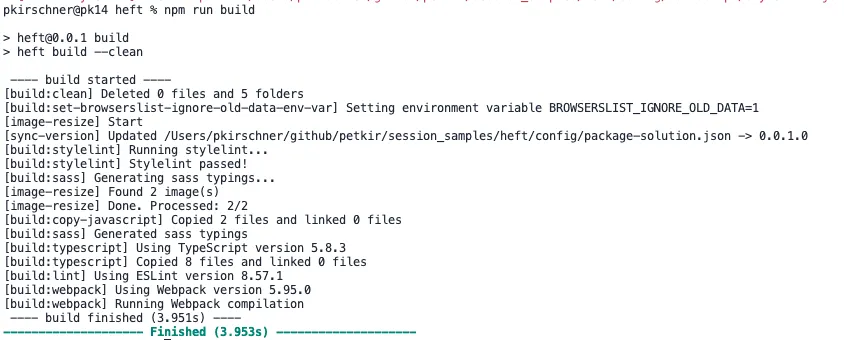
Because of the prebuild hook (if you add it), the lint task runs before the build. Alternatively, rely on the build-phase attachment so heft build includes linting.
Sample output
[style-lint] Start
src/webparts/helloWorld/components/HelloWorld.module.scss
 12:3  ✖  Unexpected duplicate selector            no-duplicate-selectors

[style-lint] Errors found.
TL;DR
- Add
config/run-script/style-lint.mjsand wire it inconfig/heft.jsonasstyle-lintphase - Add npm
style:lint(or attach to build phase) - Optional
prebuildhook to enforce linting before builds